0207 608 5500





Search ideas, news and case studies
Blog Categories
Cosec: A Powerful Management Tool Synced With Companies House


Managing several companies at once gets complicated fast without the right tool behind you. Cosec is built specifically for this, letting you import, manage, and file for multiple companies from a single dashboard, synced directly with Companies House.
Key Takeaways
- Cosec lets you import existing companies using their company number and WebFiling authentication code.
- Once imported, you can manage company details, directors, secretaries, and filings all from a single dashboard.
- Statutory form templates, including dividend vouchers, LLP agreements, and share certificates, are available directly through your account.
- Changes made in Cosec sync with Companies House in real time, so there's no separate manual filing step required.
- If you don't have your authentication code to hand, our full guide to your WebFiling authentication code covers how to find or replace it.
How Do I Import Companies Into Cosec?
Getting started means importing your existing companies first.
Head to the homepage and log in or register a new account.

Once logged in, you'll see your dashboard. Select "Import a company" on the right-hand side.
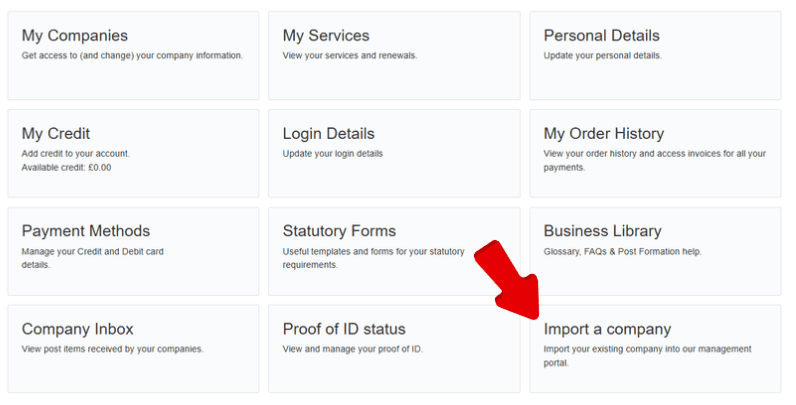
This takes you to the "Company Import" section, where you can bring a company onto our platform using its company number and WebFiling authentication code. If you're not sure where to find either of these, our guide to your WebFiling authentication code covers exactly where to look, and how to request a replacement if needed.
With your details to hand, enter the company number and authentication code, then select "Import Company."
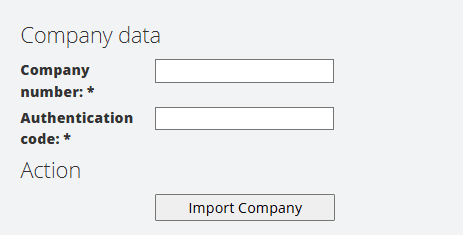
That's it, your company is now imported into Cosec, giving you access to a full set of management options from the dashboard.
Changes you make in Cosec register with Companies House automatically. There's no separate manual filing step afterward, update a director's details or file a Confirmation Statement in Cosec, and that's the actual filing done, not just a note to yourself to go file it properly elsewhere.
What Can I Actually Do From the Dashboard?
Importing companies is just the starting point. Your dashboard gives you a top-down overview of everything you're managing.
Selecting "My Companies" gives instant access to information across all your companies, letting you update details like company name, registered office, and director or secretary appointments. You can also purchase and file a Confirmation Statement for any company on your account, all from the same central location.
Your account also includes a "Statutory Forms" resource, with templates for things like a dividend voucher, LLP agreement, or share certificate, ready to use whenever you need them.
Cosec is built to work whether you're managing 10 companies or 1,000, giving you a consistent way to monitor status and make changes across a large volume of companies without it becoming unmanageable.
Does Cosec Sync With Companies House Automatically?
Yes, this is one of its core strengths. Changes you make in Cosec are registered with Companies House automatically, without a separate manual filing step, which makes managing a large portfolio of companies considerably more seamless than handling each one individually.
FAQs
What do I need to import a company into Cosec?
Just the company's registration number and its WebFiling authentication code.
Can I manage director and secretary details through Cosec?
Yes, directly from the "My Companies" section of your dashboard.
Does Cosec help with filing a Confirmation Statement?
Yes, you can purchase and file one for any company on your account directly through the platform.
What happens when I make a change in Cosec?
It syncs with Companies House automatically, so there's no need for a separate manual filing step.
What if I don't have my WebFiling authentication code?
Our full guide to your WebFiling authentication code covers how to find it or request a replacement.
This article describes our own service. Companies House processes can change, so it's worth checking current guidance if anything above doesn't match what you see in your account.